Your recordings saw everything. Now your agents do too.
Stop rewatching a call to remember what was decided. Ask Claude, Cursor, or any AI tool your team already uses, and get a cited answer, a coaching report, or any document you need. Every claim is grounded in what was actually said and shown on screen.
If that index ships as is, orders is locked for the whole backfill.
On screen · 0042_orders_index.sql, line 12
ML
Marcus34:31Decision
Then it goes out CONCURRENTLY, and the backfill moves to Sunday night.
Claude Codevia Ciev MCP
Why didn’t the orders index ship on Friday?
Building it would have locked orders for the entire backfill 34:08. The team switched to CREATE INDEX CONCURRENTLY and moved the backfill to Sunday night 34:31.
ZoomGoogle MeetUpload video
Infra ReviewMarch 14 · 3 people · screen sharedREC 34:12
Preeti is presenting
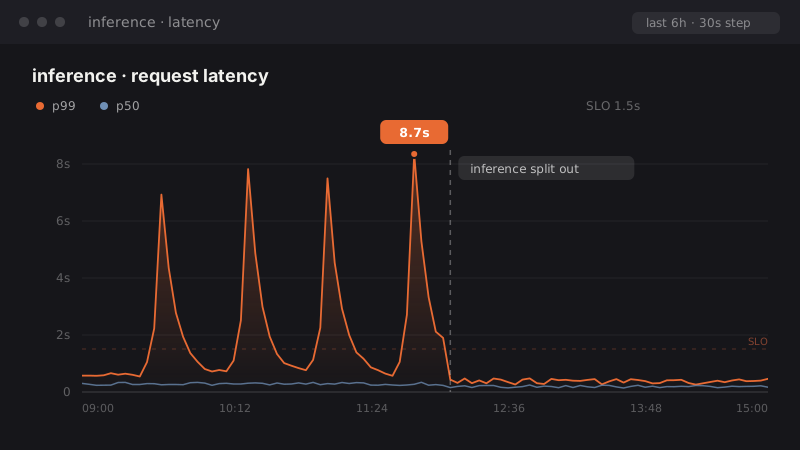
OCR · 8.7s
Preeti:…so we keep the model warm before the request hits.
PPreeti
AAlexandarmuted
34:1258:04
4 moments indexed so far
Extracting: audio + visual
audiotranscript · Preeti: "keep the model warm before the request hits"
visualocr · p99 8.7s → inference split out
CIEV
AI agents
Cursor
Claude Cowork
Gemini
Codex
any MCP client
Company platforms: via connector
Glean
M365 Copilot

Demo
Watch it work, end to end.
One recording goes in. Cited answers and finished documents come out.
New · Chrome extension
What is Ciev Recorder?
A Chrome extension that records the meetings you join and sends them straight to your Ciev.ai workspace. No bot joins your call.
Records Google Meet, Zoom and Teams calls in Chrome, automatically or in one click.
Uploads while the call is still going, so notes are ready when it ends.
Saves every few seconds, so a crash or closed tab loses seconds, not the meeting.
Nothing records unless you press Record or turn on auto-record yourself.
Make it searchablesearch by meaning or exact words
Publishlive for every agent
Extracted so farlive
04:18 · editor05:02 · diagram06:31 · chart
How it works
Three steps. Then your agent just knows.
01
Connect
Connect Zoom, Meet or Teams, or upload files. You pick which recordings go in: design reviews, onboarding walkthroughs, post-mortems, the decision that never made it into a doc. Never your whole calendar.
Ciev pulls out who said what, and what was on screen while they said it. It even fixes the terms speech-to-text always gets wrong, so "sequel C" becomes sqlc.
Audio
Transcript
Frames
OCR
Chunks
Embed
Published
03
Ask
Your agent asks in plain English. The answer comes back with the recording, the speaker, and the screen it was on.
Evidence
What an answer actually looks like.
Not a summary you have to trust. Every answer comes with its proof.
You
Why did we choose Postgres over DynamoDB for the jobs queue?
Answer
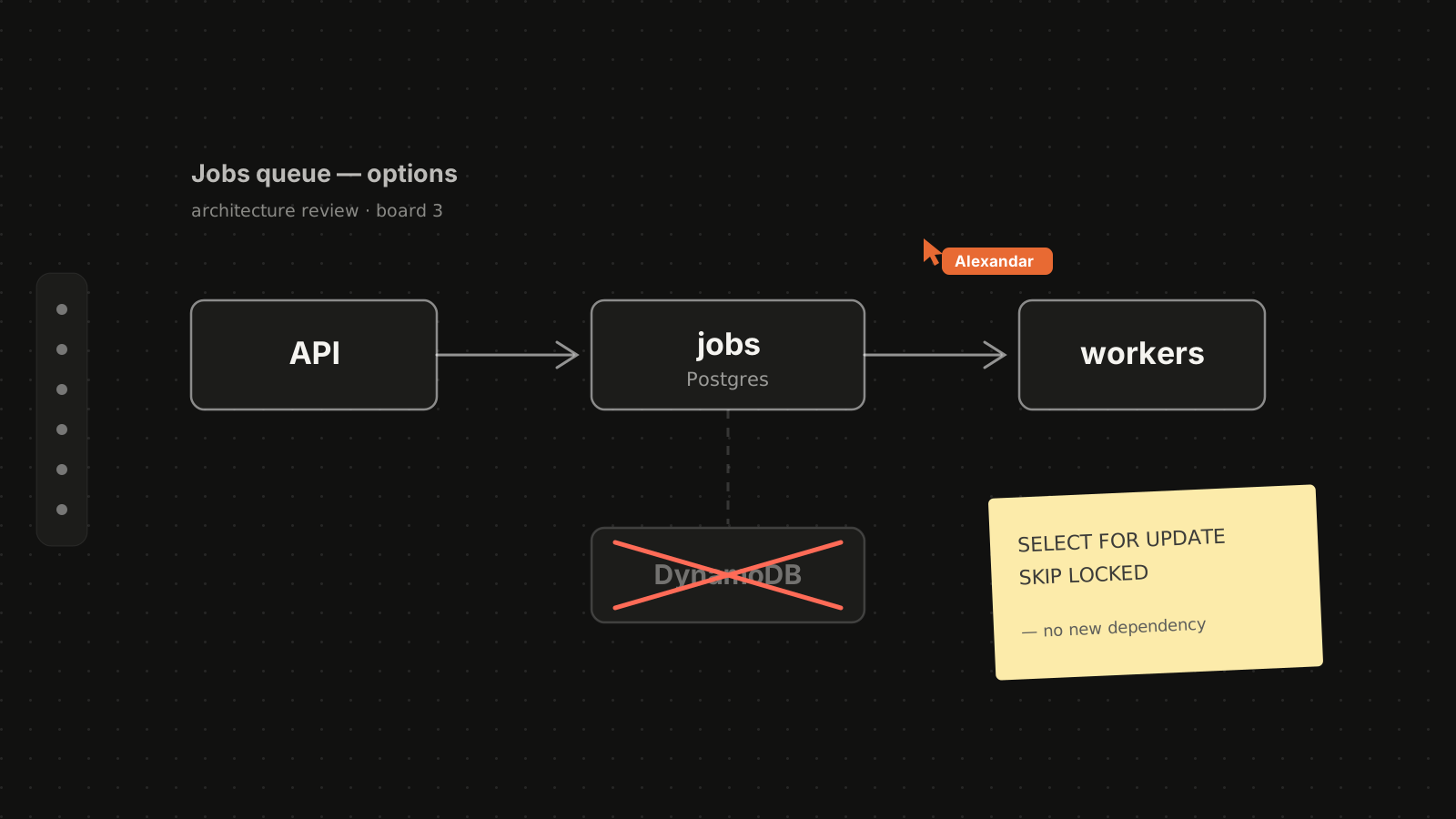
Alexandar argued that using Postgres as the job queue, via SELECT FOR UPDATE SKIP LOCKED, avoided introducing a new dependency and gave us free transactionality for publishing chunks. At 22:41 the shared whiteboard is a three-box diagram: API → Postgres jobs → workers, with DynamoDB struck through. OCR on that frame reads the SKIP LOCKED query he had pasted beside the boxes.
Backed by
The proof, from the recording
1
Alexandar, Preeti
"...we already have Postgres, we don't want another moving piece. SKIP LOCKED gives us exactly what a queue gives us, without SQS or DynamoDB pricing."
2
Miro: Jobs queue, options
22:40
read off screenAPIjobs (Postgres)workersDynamoDBSELECT FOR UPDATE SKIP LOCKED
3
Architecture Review, Jan 8, 2026
22:40 → 24:15
00:0045:00
Integration
Works where your agents already live.
MCP is the open standard AI tools use to connect to outside data. If Claude, Cursor, or whatever your team runs speaks it, this is a one-time setup, usually done by whoever's technical on the team.
claude mcp add --transport http ciev https://ciev.ai/mcp
One command. Done.
FAQ
Questions, answered.
What Ciev.ai does with your videos, and how it fits the tools you already use.
What is Ciev.ai?
Ciev.ai (pronounced “sieve”) turns recorded meetings and videos into a searchable memory. It transcribes speech with speaker labels, reads what was on screen, and indexes every moment by timestamp, so your team and your AI coding agents can ask a question and get an answer that links back to the exact minute it came from.
How do you pronounce Ciev? Is it spelled Sieve?
It’s pronounced like “sieve”: sifting a long recording down to the one moment that matters. People often type it as sieve, seave or cieve; it’s spelled C-I-E-V, at ciev.ai.
Is Ciev.ai an AI notetaker like Granola or Otter?
It does take notes: every recording gets a Meeting Digest with decisions, open questions and action items. The difference is what it keeps. Most AI notetakers work from the audio and hand you a summary. Ciev.ai also reads the video, the screen share, the code, the diagram, and keeps every moment searchable with its timestamp, so an answer can show its proof. And your AI agents can query it directly over MCP.
Can I search inside a video?
Yes. Search by meaning (“why did we move off DynamoDB?”) or by exact text such as an error message, a function name or a feature flag. Search covers both what was said and what was on screen, across every recording in your workspace.
Can Ciev.ai find or cut the exact clip from a recording?
It finds it for you. Every answer points to the exact moment: a link into the original recording that starts at that timestamp, plus the frames that were on screen, and agents can show the clip inline. Ciev.ai isn’t a video editor; it saves you from scrubbing through footage to find the part that matters.
What kinds of videos does it work with?
Zoom and Google Meet recordings, a video link, or a file you upload, including Microsoft Teams recordings. It’s built for recordings that explain how things work: onboarding walkthroughs, design and architecture reviews, incident reviews, demos and technical interviews.
Which AI tools can use it?
Any tool that speaks the Model Context Protocol (MCP): Claude Code, Claude Desktop, Cursor, GitHub Copilot and more. Agents can search recordings, match exact text, read the full passage, open the clip at the right timestamp, look at the frames, and fetch a meeting’s digest. Ciev.ai also connects to Glean for company-wide search.
Does it work for technical interviews?
Yes. A recorded technical interview becomes a candidate-facing coaching report: strengths, focus areas, rubric-graded competencies and an overall recommendation, with every claim linked to the moment in the recording it came from.
How do I get started?
Schedule a demo. We onboard teams by hand for now, to make sure it works well with your recordings and tools.